
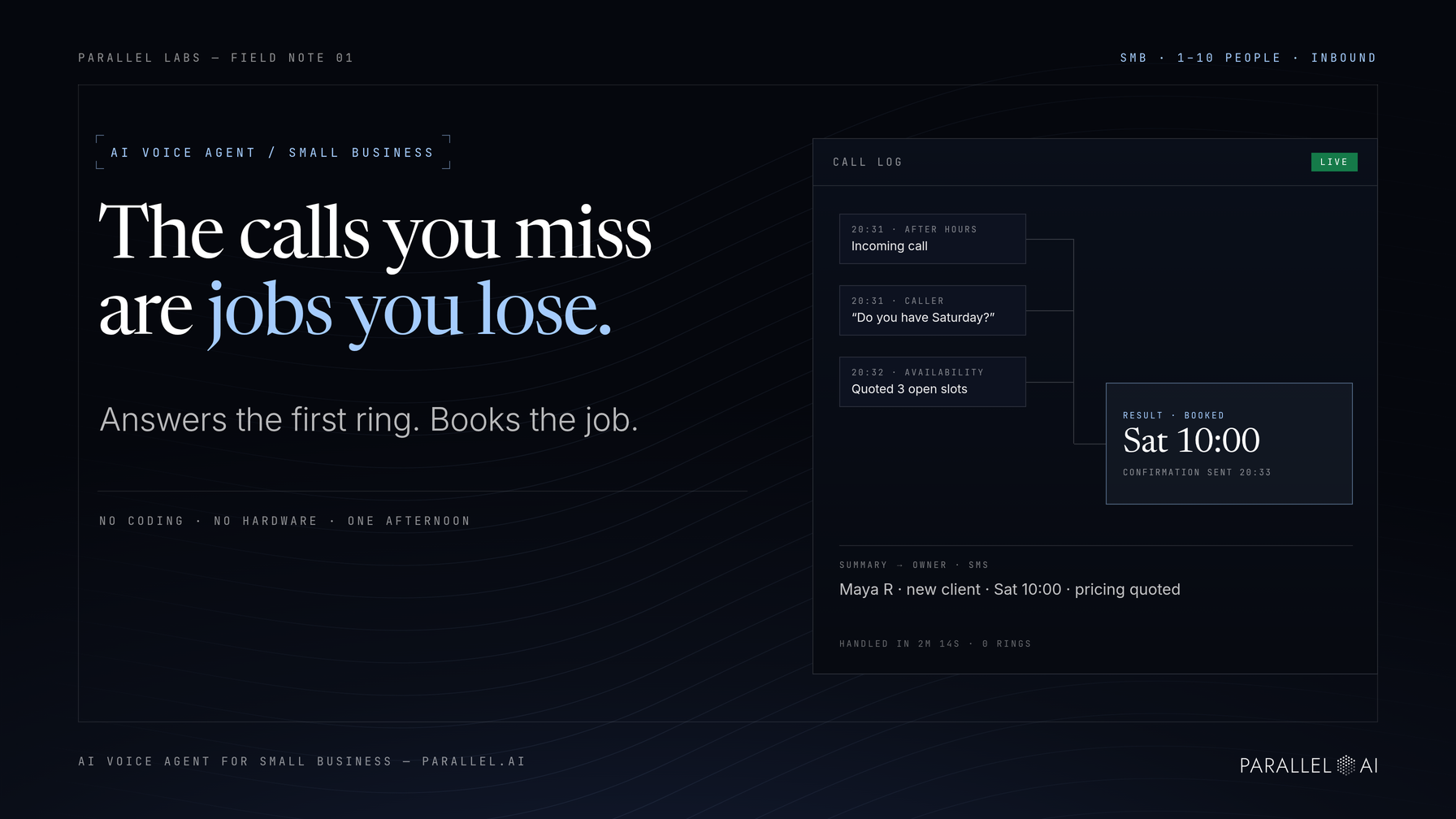
An AI voice agent for small business turns your phone into a front line that runs itself. It answers inbound calls in natural conversation, places outbound follow-ups, and hands anything complicated over to you with a full summary attached. No coding and no hardware. You load your business information, write plain-language instructions, and connect a phone number.
This matters most for owners, office managers, and operations leads at 1-10 person businesses: salons, service companies, real estate offices, wellness studios, restaurants, and retail shops. These are the places where the phone rings hardest while everyone is already busy. Below you'll find seven practical uses, a setup you can finish in an afternoon, and an honest look at when a call still belongs with a human.
What an AI Voice Agent for Small Business Actually Does
An AI voice agent holds real phone conversations and takes action on them. It listens to the caller, answers using your business's own information, and completes tasks on the spot. That might mean quoting availability, booking an appointment, capturing a message, or transferring the call with a summary of everything already discussed.
The difference from an auto-attendant is conversation. Nobody presses 1 for sales. The caller asks a question and gets an answer drawn from your knowledge base: your hours, services, pricing, and FAQs. Because the agent reads documents you control, it speaks about your business, not a generic script.
Answering inbound calls is the familiar job. The same agent can place outbound calls too, following up on quotes, confirming appointments, and checking in with leads on a schedule. It's a receptionist and an assistant in one, working every hour you're not.
Where Does a Voice Agent Fit Into Your Daily Call Handling?
The highest-value inbound jobs are the ones quietly costing you money: calls that ring after hours, calls that hit a busy line, callers who hang up before anyone qualifies them, and bookings that die waiting for a callback. A voice agent covers all four.
Answering After-Hours and Overflow Calls
Picture a salon that closes at 6:00. A new customer calls at 8:30 p.m. wanting a Saturday appointment, because tonight is the only time she has to book. With voicemail, that booking depends on her answering a callback tomorrow, if she hasn't booked somewhere else first. A voice agent answers on the first ring, quotes Saturday's open slots, confirms the appointment, and sends a confirmation while she's still on the line.
Overflow works the same way during business hours. When you're mid-appointment or mid-rush, the agent takes the second line. Callers never hear a busy signal or sit through six rings.
Qualifying Callers Before They Reach You
A voice agent can ask two or three screening questions before a call reaches your desk: what the caller needs, their timeline, their location, and whether they're comparing providers. For professional services and real estate offices, that filters dead-end calls so your callback time goes to genuine prospects. The answers land on the caller's record for context.
Booking Appointments During the Call
The moment a caller asks "do you have anything Thursday?", the agent can offer open slots, confirm the choice, and log the booking against the same availability your team uses. The caller gets certainty on the call instead of "someone will call you back," which is exactly where many small bookings quietly die.
Handing Complex Issues to a Person, With Context
Some calls need a human, full stop. The agent's job is a clean handoff. It either transfers the call live or takes a detailed message, and either way you receive a summary of who called, what they need, and what was already discussed. You never walk into a callback blind. The caller never has to repeat their story twice.
Putting a Voice Agent to Work on Outbound Calls
Outbound is where many small businesses feel the impact fastest, because it's the work that never happens when the team is busy. A voice agent does that dialing on a schedule, with notes on every attempt.
Following Up on Every Lead
A service business that sends quotes, whether plumbing, landscaping, design, or consulting, usually loses jobs in the gap between the estimate and the customer's decision. The owner intends to follow up, then the week fills up. A voice agent places that follow-up call a day or two after each quote goes out, checks in again the next week, and logs every attempt on the lead's record. That follow-up call is often the difference between winning the job and losing it to whoever called second.
Confirming Appointments and Cutting No-Shows
A day-before confirmation is one of the cheapest ways to protect revenue, and it's easy to delegate. The agent calls or texts each appointment, confirms the time, and offers to reschedule if something has changed. When a cancellation comes in, you hear about it early enough to fill the slot instead of eating an empty hour.
Running Multi-Channel Outreach From One Record
Follow-up rarely lives on the phone alone. A well-built sequence might go like this: call on day one, text if there's no answer, email two days later, then call again. In a fragmented tool stack, each channel sits in its own app and the same lead gets tracked three different ways. On an all-in-one platform like Parallel AI, voice and chat agents share one contact record, one knowledge base, and one lead system. A prospect who chatted on your website and calls a week later gets recognized, and Smart Lists and outreach sequences keep that prospect moving without anything falling between tools.
How to Set One Up Without Technical Skills
Setting up a voice agent is a fill-in-the-forms process, closer to onboarding a new hire than to a software project. Five steps cover it.
1. Load your knowledge base. Paste or upload what the agent should answer from: your FAQ page, service list, hours, pricing approach, and cancellation terms. The agent only knows what you give it, so this step determines call quality more than anything else.
2. Write the agent's instructions. In plain sentences, describe how it should greet callers, what it should answer directly, and what it should escalate. "If a caller asks about a refund, take their details and offer a callback, and never promise money back" is a complete, usable instruction.
3. Connect a phone number. Use a number you already own or set up a new one. Then decide routing: after-hours only, overflow when your line is busy, or all inbound calls, depending on how much you want to delegate.
4. Test the call, hard. Call your own business and ask awkward questions: the price you never published, the service you discontinued, a complaint. Every stumble tells you what to add to the knowledge base or instructions. Two or three rounds of this separate an agent that impresses from one that frustrates.
5. Add human approval before anything sensitive goes out. Configure the agent to hold consequential actions, like refunds, discounts, and commitments, for your review. Start with approval on everything, then loosen it as the agent earns trust on routine work.
One Platform Instead of a Stack of Tools
Voice is usually the second or third AI capability a small business adopts, after chat and content. Platforms that consolidate those, like Parallel AI, combine voice and chat agents with Smart Lists, outreach sequences, and a content engine in a single system. Every capability reads from the same knowledge base and lead records. That's how a phone call, a website chat, and an email campaign stay connected to one customer instead of scattered across subscriptions.
When Should a Call Go to a Human Instead?
Escalate to a person whenever the call needs judgment, empathy, or accountability: an upset customer, a billing dispute, a delicate negotiation, or any question the agent can't answer confidently. A well-configured agent handles that honestly. It says "let me connect you with someone who can help" or takes a detailed message, rather than guessing. Build those escalation rules when you write the instructions, not after the first bad call. The goal was never to remove people from the phone. It's to reserve people for the conversations that genuinely need them.
Start With One Call Type, Then Expand
The pattern that works for small businesses is narrow first, wide later. The essentials:
- An AI voice agent answers and places calls in natural conversation, working from your own business information, with no coding required.
- Inbound, it covers after-hours and overflow calls, caller qualification, on-call booking, and warm handoffs with full context.
- Outbound, it follows up on every lead, confirms appointments, and runs call, SMS, WhatsApp, and email steps from a single prospect record.
- Setup runs knowledge base, instructions, phone number, hard testing, then human approval, in that order.
- Judgment calls, like angry customers and disputes, still go to a human, by design.
Parallel AI's 7-day free trial is enough time to load your FAQ page, write instructions for one call type, and place a real test call to your own business. Start with after-hours answering, listen to a week of calls, and expand from there. Your phone becomes the most reliable employee you have, and this one never takes a lunch break.